By Walter Jobs, Technology writer and editor. Manufacturer sources and model scenarios reviewed 2 November 2026.
The best CPU for an RTX 5060 is often the capable processor you can keep. For a purchase, compare a Ryzen 5 5600X in a supported AM4 system, a Ryzen 5 7600 for a new AM5 build, and a Core i5-12400F when retaining a compatible Intel platform. Avoid diverting a large share of the budget to a premium CPU unless your actual games justify it.
As an Amazon Associate we earn from qualifying purchases. This does not change the price you pay, and a commission never affects what we recommend. Full disclosure.
This page covers the desktop RTX 5060 8GB, not the 5060 Ti. Its memory capacity and graphics connection deserve separate attention. A stronger CPU can improve a CPU-limited workload, but it cannot increase the card’s VRAM or guarantee that every game will reach the same FPS.
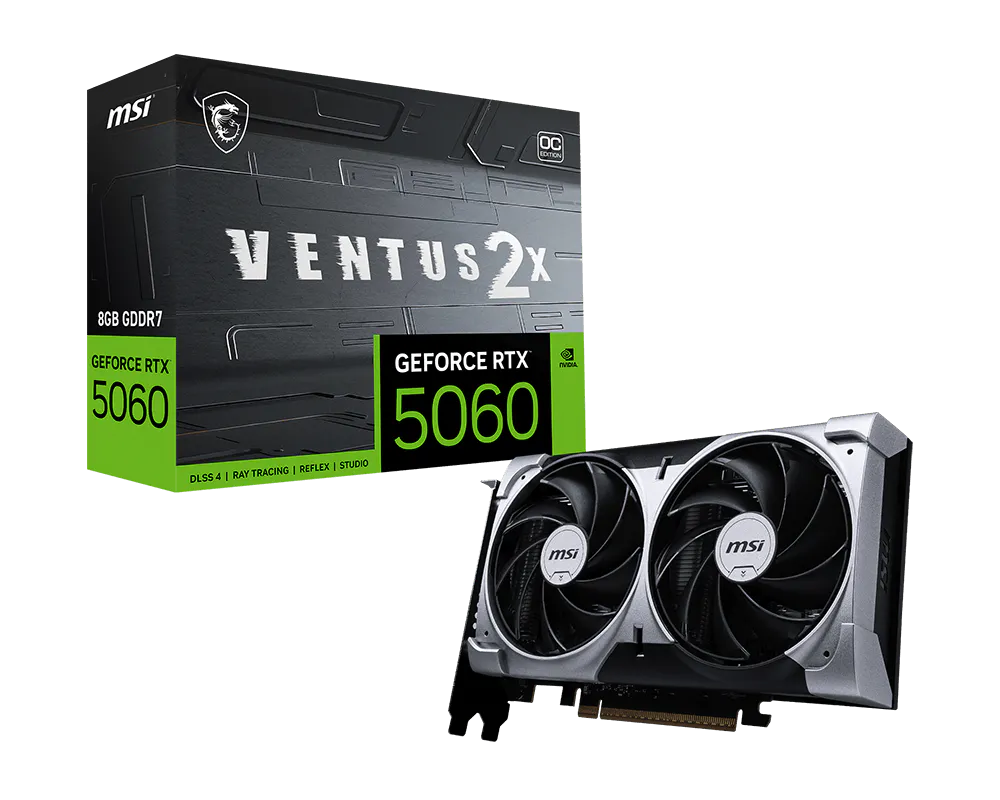
Confirm the non-Ti card and graphics link
| Manufacturer field | Published reference |
|---|---|
| GPU model covered | Desktop RTX 5060, not RTX 5060 Ti |
| Standard memory | 8 GB GDDR7 |
| Memory interface | 128-bit |
| Total Graphics Power | 145 W |
| NVIDIA reference system power | 550 W; exact system requirements vary |
NVIDIA’s RTX 5060 family page separates the standard and Ti models. For the pictured retail board, MSI specifies a Gen 5 physical x16 connection using eight lanes. The connector’s physical length should not be mistaken for sixteen active lanes.
An older PCIe link does not automatically make a card incompatible, but it changes the available connection. Check the CPU, board, BIOS and primary-slot routing together. Measurements from a 5060 Ti should not be relabelled as measurements of this standard 5060. We have not measured a generation-by-generation PCIe penalty for this card.
Three sensible CPU routes
| Candidate | Reason to compare it | Purchase check |
|---|---|---|
| Ryzen 5 5600X | Keeping a supported AM4 board and DDR4 | Verify BIOS and the main graphics-slot link before buying. Find offerson Amazon |
| Ryzen 5 7600 | Starting a new AM5 system | Compare motherboard and DDR5 costs with your whole build budget. Find offerson Amazon |
| Core i5-12400F | Retaining a compatible Intel system | Check the motherboard memory type and official CPU support list. Find offerson Amazon |
The shortlist follows ownership and platform cost. A CPU that is attractive when reusing a motherboard is not necessarily the best starting point for a completely new build. Compare the amount you must spend to assemble each working system, including memory, cooling and any required firmware support.
Ryzen 5 5600X: retain a suitable AM4 system

The 5600X is worth comparing if you already have a supported board and DDR4. Its AMD specification includes PCIe 4.0 support. That is a CPU capability, not a guarantee that an older board offers the same generation on its graphics slot. Check the exact board manual and CPU support list.
If you already own a 5600X, establish a CPU shortfall before replacing it. A GPU-limited game at your preferred settings may gain little from a more expensive processor. If buying an AM4 CPU, compare the 5600X offer with other supported options rather than paying a premium for the letter X alone.
The model includes the Ryzen 5 5500 for context. That processor’s PCIe 3.0 capability is a meaningful platform difference that the generic FPS engine does not simulate. A close model result cannot therefore settle the choice between those CPUs for a narrower graphics link. Check measured evidence for the actual card, memory conditions and games.
Ryzen 5 7600: compare a complete new AM5 build
A new build changes the question from “what fits my board?” to “which complete platform meets the budget?” The Ryzen 5 7600 specification is the starting point for a supported AM5 motherboard and DDR5 configuration. Confirm the actual package contents and cooling plan when comparing boxed and tray offers.
Price the platform before allocating the rest of the budget. A new socket’s future options can be useful, but they do not make an RTX 5060 perform like a higher graphics tier. If the new-platform premium forces an unsuitable GPU, insufficient memory or a poor-quality PSU, reconsider the complete build rather than protecting one component choice.
Core i5-12400F: keep compatible Intel parts useful
The 12400F is the comparison for a compatible Intel board, not a requirement to pair NVIDIA with Intel. Use Intel’s official processor specification alongside the motherboard’s support list. Check the board’s memory type; a DDR4 installation cannot be converted to DDR5 by changing a BIOS option.
An existing system that reaches the target can stay in service. For a new purchase, compare the whole Intel bundle against an AM5 quote rather than assuming an older CPU is cheaper overall. Note that the F model does not supply integrated graphics for display troubleshooting if the discrete card is removed.
Model scenarios: why similar numbers need context
| CPU | 1080p estimated FPS | 1440p estimated FPS | 4K estimated FPS |
|---|---|---|---|
| Ryzen 5 5500 | 69 | 52 | 20 |
| Ryzen 5 5600X | 70 | 52 | 20 |
| Core i5-12400F | 70 | 52 | 20 |
| Ryzen 5 7600 | 70 | 52 | 20 |
| Ryzen 5 9600X | 70 | 52 | 20 |
All five CPU entries round to 52 estimated FPS at 1440p and 20 at 4K in this generic High-preset model. That outcome says the model’s graphics workload dominates those scenarios. It does not show that the 5500, 12400F and 9600X have identical game performance, nor does it capture their platform differences.
Use the comparison to question an unnecessary CPU premium. Then check measured results for the games where you need more CPU headroom. The model does not include PCIe transfer behaviour, VRAM overflow, individual drivers, game-specific simulation or frame-time tails. Those omissions matter particularly when a table is being used to decide between platforms.
Do not ask the CPU to solve graphics-memory limits
The standard RTX 5060’s 8GB memory is part of the graphics card. A faster CPU does not increase it. If a game struggles at a texture preset or with demanding ray tracing, change one relevant setting at a time and compare a repeatable scene. High allocation shown by a monitoring overlay alone is not enough to identify the cause.
Also distinguish native rendered performance, upscaled rendering and generated frames. When a supported game inserts frames, a larger displayed counter does not prove that the processor is preparing unique game states at that speed. Compare input response and base performance before deciding that a CPU bottleneck has disappeared.
The correct upgrade sequence is the one that fixes the observed problem. Our guide to pairing a CPU and GPU properly explains how to work from a game target, while the CPU pairing hub gives alternatives for other graphics tiers.
How we selected and checked these options
This article uses verified manufacturer specifications, platform reasoning and PairMyRig calculations. It does not report hands-on laboratory testing. The estimates use generic gaming, High preset and 32GB RAM, without named-game benchmarks, measured 1% lows, PCIe penalties or generated-frame results. Read the method and limitations before treating the figures as evidence for a purchase.
Finish by checking the exact retail card’s connector, case clearance and PSU guidance. The power planning calculator helps organise the components; it cannot establish the condition or quality of a PSU you already own. Keep room in the budget for any installation requirement the real system needs.
Explore another pairing scenario
Choose a different processor. Select High preset and 32GB system RAM to match the model table.
Frequently asked questions
Does an RTX 5060 need a PCIe 5.0 CPU?
Not as a blanket requirement for a compatible installation. Older links can change available bandwidth, so check the exact board and measured behaviour for the standard 5060. A premium CPU is not automatically justified by the connection label.
Will a Ryzen 5 5600X work with an RTX 5060?
They can form a compatible system when the motherboard, BIOS, slot, power and case requirements are satisfied. Whether the combination meets your target still depends on the game and settings.
Can a better CPU make the 5060 behave like a 16GB card?
No. The GPU retains its physical 8GB capacity. Diagnose the graphics workload and memory behaviour separately from CPU performance before choosing an upgrade.
Are these numbers frame-generation results?
No. They are generic PairMyRig model estimates. The model does not simulate frame generation, image quality, input latency or measured game frame times.