By Walter Jobs, Technology writer and editor. Manufacturer sources, competitor coverage and model scenarios reviewed 2 November 2026.
For a Core Ultra 5 245K, compare the RX 9070 XT for a larger graphics upgrade, the RTX 5070 Ti for a specific NVIDIA-supported workload, and the RX 9060 XT 16GB when a smaller purchase meets the target. Start from the graphics card you own and the display or application you want to improve. The CPU does not impose a minimum graphics budget.
As an Amazon Associate we earn from qualifying purchases. This does not change the price you pay, and a commission never affects what we recommend. Full disclosure.
This is an LGA1851 and DDR5 platform, not a drop-in continuation of an older LGA1700 i5 system. If the 245K is already installed and performing adequately, assess the graphics change before replacing the CPU or motherboard.
GPU shortlist by workload
| Product | When to compare it | Before buying |
|---|---|---|
| A substantial graphics-quality or display upgrade | Check the exact board, case and whole-system power needs. Find offerson Amazon |
|
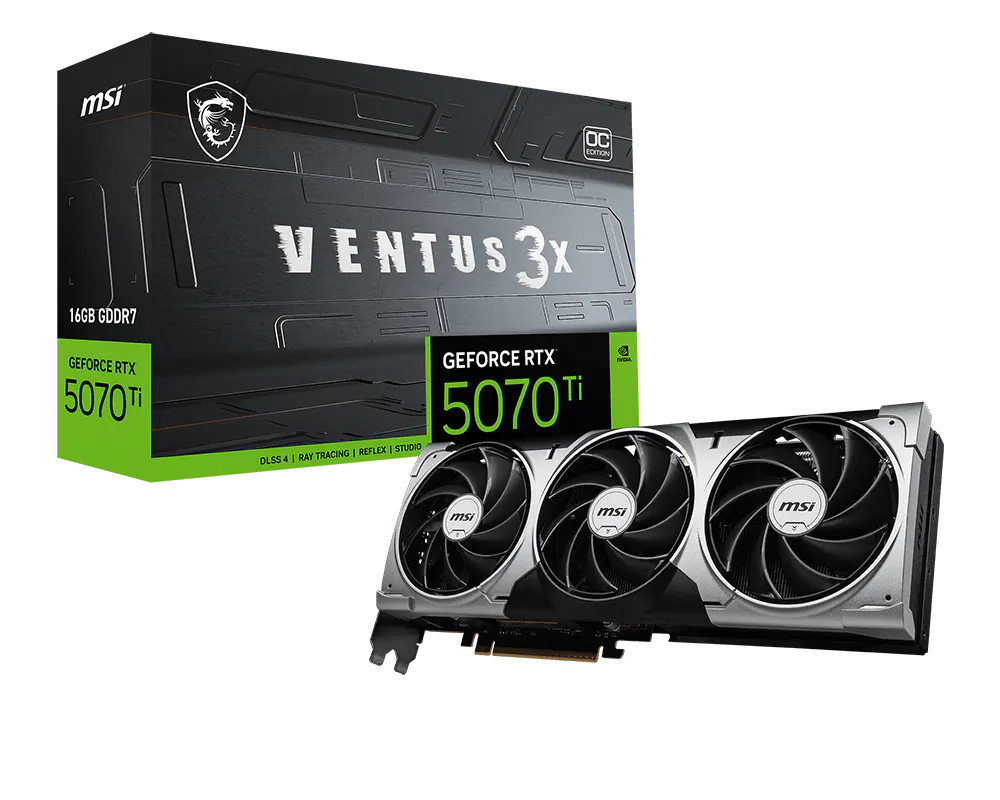 GeForce RTX 5070 Ti |
A supported NVIDIA feature or application requirement | Validate the software benefit rather than choosing by CPU brand. Find offerson Amazon |
| A smaller purchase that reaches the actual target | Compare against the owned card and the exact 16GB offer. Find offerson Amazon |
The photos identify real retail boards. Other versions of the same GPU can have different dimensions, connectors, power guidance and acoustics. The pictured ASUS and MSI coolers are examples, not universal descriptions of every offer in a graphics family.
RX 9070 XT: a substantial graphics step
The RX 9070 XT belongs in the comparison when your current card misses a demanding graphics-quality or display goal. Check the size of the improvement from the owned GPU at the settings you actually want. A higher tier is not useful merely because the processor could accompany it.
Evaluate game-specific ray tracing, upscaling and application support separately from a generic raster estimate. More memory or a newer architecture label cannot decide every workload. Include any required PSU or case change in the complete price before calling the GPU-only upgrade affordable.
RTX 5070 Ti: choose supported features deliberately
The RTX 5070 Ti is a separate candidate when a game implementation or application gives you a concrete reason to choose NVIDIA. Keep the Ti specification apart from the standard 5070. Check the relevant application version and acceleration path rather than assuming that a brand badge guarantees a useful advantage.
For streaming or creation, define the encoder, codec and software settings. Hardware encoding, CPU software encoding and GPU rendering are different workloads. A gaming FPS model does not predict export time or simultaneous capture overhead.
RX 9060 XT 16GB: a smaller purchase can be right
The 16GB RX 9060 XT is worth pricing when it can reach the target without a larger graphics spend. Check the exact memory variant: an 8GB offer is not the same configuration. Capacity matters to some settings and workloads, but does not provide a complete processing-performance ranking.
Compare the gain over your present card. A moderate product can be a major improvement from a weak GPU and a poor sidegrade from a stronger one. Keeping the existing card is also valid if the new purchase does not change the experience enough.
Know the 245K platform you already have
| Manufacturer field | Published reference |
|---|---|
| CPU cores / threads | 14 / 14: 6 P-cores and 8 E-cores |
| Socket | LGA1851 |
| System memory support | DDR5; up to 6400 MT/s in Intel specifications |
| CPU PCIe support | 5.0 and 4.0; board routing varies |
| Processor Base / Maximum Turbo Power | 125 W / 159 W |
The 245K has fourteen cores and fourteen threads. Do not transfer the thread count of a similarly numbered older hybrid Intel CPU. Its DDR5-only LGA1851 requirements also differ from DDR4-capable LGA1700 systems.
Check the exact motherboard manual for the main graphics slot, electrical lane count and sharing with installed devices. Processor PCIe support is not a description of every slot on every board. Confirm BIOS and platform configuration before using a generic model result to diagnose performance.
Match the GPU purchase to the job
| Your situation | Best next comparison | Do not assume |
|---|---|---|
| Current GPU misses a demanding graphics target | Compare larger graphics tiers and supporting costs | Fourteen cores obligate a flagship GPU. |
| A specific production or streaming workflow matters | Verify application acceleration and codec needs | Generic gaming FPS predicts export or encoding performance. |
| A smaller card already reaches the goal | Compare the moderate purchase or keep the current GPU | A larger compatible GPU is automatically better value. |
Put complete current quotes against those routes. A required power supply, cable or case change belongs in the graphics-upgrade cost. For an owned 245K system, the CPU and memory already in service should remain the baseline rather than being automatically replaced.
Graphics tiers in the generic model
| GPU | 1080p estimated FPS | 1440p estimated FPS | 4K estimated FPS |
|---|---|---|---|
| Radeon RX 6600 | 50 | 37 | 14 |
| GeForce RTX 5060 | 70 | 52 | 20 |
| Radeon RX 9060 XT 16GB | 77 | 57 | 33 |
| GeForce RTX 5070 | 116 | 86 | 50 |
| Radeon RX 9070 XT | 131 | 98 | 57 |
| GeForce RTX 5070 Ti | 136 | 102 | 59 |
The 1440p High estimates rise from 57 FPS with the RX 9060 XT 16GB to 98 with the RX 9070 XT and 102 with the RTX 5070 Ti. These are outputs of stored gaming indices, not measured game results. A small difference between the larger cards is not a ray-tracing or application-performance ranking.
The engine does not reproduce every game engine, CPU scheduling behaviour, driver, PCIe configuration or frame-time tail. It can help compare scenarios consistently, but cannot establish the fastest sensible card for all workloads or a fixed GPU ceiling for the processor.
Intel graphics branding does not decide the discrete GPU
An Intel CPU does not require an Intel discrete graphics card. Compare the software you use and the complete installation requirements. The 245K’s integrated graphics can be relevant to troubleshooting or an application workflow, but that is separate from deciding which discrete GPU reaches your gaming target.
If you are evaluating an Arc alternative, verify its exact platform and Resizable BAR guidance instead of assuming that Intel branding settles eligibility. Our B580 platform guide explains why firmware configuration matters.
Validate the upgrade before changing the platform
Choose a repeatable scene or application job that misses the goal. Check caps, temperatures, memory configuration and background activity. In a game, reduce graphics demand while keeping the scene comparable, then investigate whether the remaining shortfall is actually CPU-heavy.
A GPU purchase does not automatically justify moving to a newer CPU model. Compare the graphics-only improvement against the cost and measured benefit of a broader platform change. Use our pairing guide for the diagnosis and PSU planner for the complete parts list.
Evidence and research method
This shortlist uses checked manufacturer information, editorial workload reasoning and PairMyRig calculations. We did not lab-test these combinations. The model uses generic gaming, High preset and 32GB RAM, without measured named-game FPS, 1% lows, ray tracing, encoding or generated-frame results.
Primary reference: official Intel product specifications.
Read the calculation method for the limitations. The GPU pairing hub provides other CPU starting points when comparing a wider upgrade.
Explore another pairing scenario
Choose another graphics card. Select High preset and 32GB system RAM to match the table, and confirm the memory version of the selected GPU.
Frequently asked questions
Does the 245K work in an LGA1700 motherboard?
It uses LGA1851, not LGA1700. Check the exact board CPU list and platform requirements rather than assuming an older Intel socket supports it.
Can I reuse DDR4 with the 245K?
The processor’s platform uses DDR5. An older DDR4 installation is not converted by a BIOS option or a discrete graphics upgrade.
Must an Intel CPU use an Intel graphics card?
No. Choose the discrete GPU from the workload, software and complete system requirements. Brand matching alone does not establish compatibility or value.
Do fourteen cores mean fourteen or twenty threads?
Intel lists fourteen threads for the 245K. Do not borrow the thread count from a different hybrid Intel processor with a similar market position.